
|
Identifying the ItsPayd processing fee CodeThis Help File Page was last Modified on 03/21/2018 |


|
|
Identifying the ItsPayd processing fee CodeThis Help File Page was last Modified on 03/21/2018 |
 Scroll to Top of Page
 Print Topic
 Email Feedback
 Show/Hide Expanders
❖This chapter is being reviewed/revised
❑The ItsPayd FTP Configuration Form used by the optional ItsPayd service (e.g., it must be Purchased and then Registered) requires the User to identify a Fees Sale Item Code for the associated ItsPayd processing fees
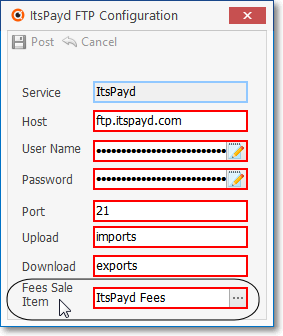
ItsPayd FTP Configuration dialog - Fees Sale Item
•Sale Item - this field requires the Code that will used to track the associated ItsPayd processing Fees.
✓To facilitate the proper posting of the Receipts imported from ItsPayd, the Code for that processing Fee must be defined as a Sale-Purchase Item
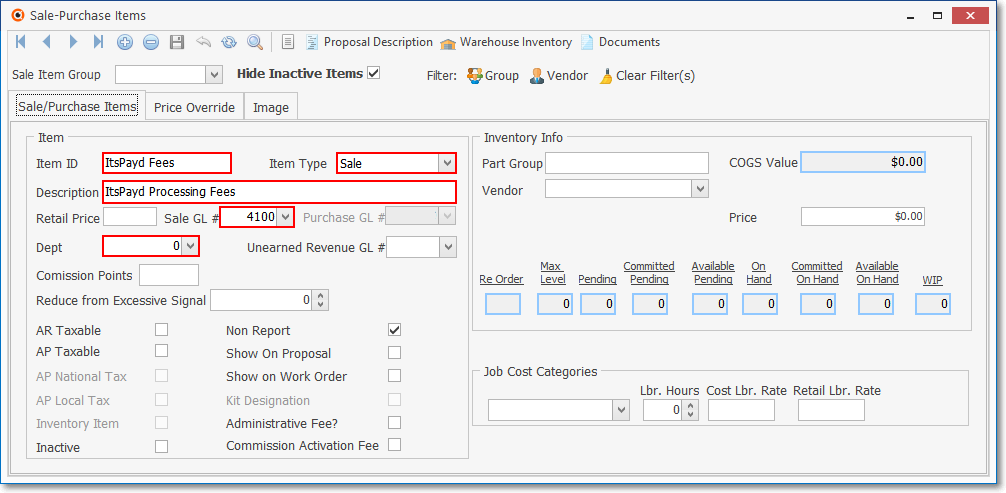
Sale-Purchase Item Form - Itspayd Processing Fees definition
•Sale GL # - The proper Sale GL # General Ledger Account Number must be assigned to the ItsPayd processing Fee Sale-Purchase Item record to ensure that all ItsPayd processing Fees incurred, are tracked and posted to the appropriate General Ledger Accounts.
✓This processing Fee Code is entered in the Fees Sale Item field on the ItsPayd FTP Configuration Form.
✓This processing Fee Code is used later when offsetting the ItsPayd processing Fee that is internally charged (see the Why? and How? discussions below).
•Why? - Why is this ItsPayd processing Fee Sale-Purchase Item Code required?
✓When a Subscriber pays any portion of a Balance Due on an Invoice to ItsPayd, logically, the entire Amount collected needs to be applied to that open Invoice.
✓However, an ItsPayd processing Fee for collecting that payment Amount has been incurred.
▪This ItsPayd processing Fee is not paid by the Subscriber, it is assessed to your Company.
✓Therefore, instead of depositing the entire payment (Receipt) that was collected by ItsPayd: The Amount collected minus the ItsPayd processing Fee is posted to the Invoice as follows:
a)The processing Fee is deducted from the collected Amount and the resulting net Amount is posted to the Invoice;
b)That same net Amount is Allocated to the associated Invoice.
•How? - Understanding how this Financial Transaction is posted within MKMS when importing and recording the collected Amounts:
1.First, a Receipt record is created for the net Amount that was actually deposited (i.e., the Amount collected minus the ItsPayd processing Fee)
✓That same net Amount is Allocated to the associated open Invoice.
1.Next, a Credit Memo is created for the cost of that ItsPayd processing Fee.
✓That same Fee cost is also Allocated to the associated open Invoice.
•The result: the actual Amount that was collected by ItsPayd has now been properly applied to the Invoice.