
|
Understanding How CSIDs are ConstructedThis Help File Page was issued on 09/30/2017 This Help File Page was last Modified on 11/25/2022 |


|
|
Understanding How CSIDs are ConstructedThis Help File Page was issued on 09/30/2017 This Help File Page was last Modified on 11/25/2022 |
 Scroll to Top of Page
 Print Topic
 Email Feedback
 Show/Hide Expanders
❑The CSID - Within MKMS and MKMSCS there are countless references to the CSID (Central Station Identification Digits).
•The makeup of the CSID is more than it seems on the surface.
✓In its most basic form, the CSID identifies the Account Number programmed into the Control Panel at a Subscriber's Premises.
▪The CSID cannot begin with a Space.
▪If a leading Space is entered in error, the system will remove it.
✓By including specified Prefix and Suffix information as part of that CSID, the Account Number may also identify any, or all of the following:
▪The Receiver, Group, Dealer, and/or Service Area
▪Other Company or Dealer specific characteristics of the Account Number
•A CSID may consist of any combination of the following three elements - the combination of which may be no more than 40 characters in length:
1)Prefix - An optional Prefix with up to a maximum of 12 characters.
2)Base - The actual "Base" CSID (the Account Number programmed into the Control Panel) which may consist of up to 19 numbers.
3)Suffix - An optional Suffix with up to a maximum of 9 characters - but if 9 or fewer characters are used in the Prefix, as many as 12 characters may be used for the Suffix.
✓In the CSID Generator Form any combination of CSID Prefix, and a CSID Suffix, along with the starting Base CSID Number, plus a Name (indicating its appropriate usage) may be predefined.
▪This CSID Generator may be used to identify the next available account number - as would be the case if it is used to identify the next available CSID in the Subscriber Panels section of the Central Station Data, when a new CSID is being added to a Subscriber's Premises.
❑Entering a CSID - There are three ways to enter a CSID for a Subscriber:
•Multiple CSID assignments may be created using the Create Mass Accounts Form.

Mass Account Creation Form
✓The appropriate Prefix and/or Suffix will be included automatically.
•An individual CSID may be manually assigned to a Subscriber in the Subscriber Panels section within the Monitoring tab on the Edit View of the Subscriber Form.
✓The appropriate Prefix and/or Suffix must be entered manually, as well.

Manually enter CSID in Subscriber Panels section
❑Automating the CSID Assignment process:
•An individual CSID may be assigned to a Subscriber in the Subscriber Panels section using the CSID Generator function:
✓Add - Click the  Icon to start a new Subscriber Panel entry
✓CSID - Using the Drop-Down Selection List provided, the User will Choose a CSID Generator Name
▪The CSID Generator record associated with the selected Name will automatically insert the next available CSID.
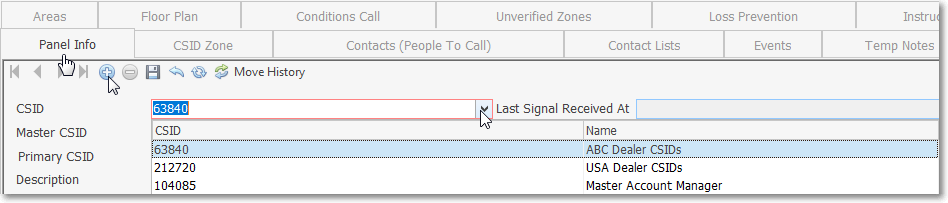
Subscriber Panels section - Subscriber Info tab - CSID field - CSID Generator list
▪When using the CSID Generator function, the appropriate Prefix and/or Suffix will be included - along with the Base CSID - as the requested CSID is inserted into the Subscriber Panels CSID field.