
|
NACHAThis Help File Page was last Modified on 12/07/2018 |


|
|
NACHAThis Help File Page was last Modified on 12/07/2018 |
 Scroll to Top of Page
 Print Topic
 Email Feedback
 Show/Hide Expanders
*******************************************************
* INSTRUCTIONS FOR NACHA PAY IMPORT *
*******************************************************
This Chapter is still being revised!
❑NACHA
File Type: Drafts Bank Accounts and Credit Cards
- Requires EFTID, Destination, OrigDFI, and DestinationABA fields in Bank Table
- Produces 94 Character Fixed Width File
- Output Fields
- File Header Record
1. Hard Coded Value = '101' (3 Characters)
2. Bank.DestinationABA - Company's Bank Routing Number (10 Characters)
3. Bank.EFTID - Company's ID number with the Bank (10 Characters)
4. Current Date - Format=yymmdd (6 Characters)
5. CurrentTime - Format=hhmm (4 Characters)
6. Hard Coded Value = 'A0941101' (7 Characters)
7. Bank.Destination - Company's Bank Name (23 Characters)
8. UserOptions.CompanyName - Company's Name (23 Characters)
9. BLANK - (8 Characters)
- Batch Header Record
1. Hard Coded Value = '5200' (4 Characters)
2. UserOptions.CompanyName - (16 Characters)
3. BLANK - (20 SPACES)
4. Bank.EFTID - (10 Characters)
5. Hard Coded Value = 'PPD'
6. Entry Description = Entered on Post Auto Draft Form (10 Characters)
7. BLANK - (6 SPACES)
8. Draft Date - Entered on Post Auto Draft Form (6 Characters)
9. Hard Coded Value = '1' (4 Characters 3 SPACES and the number 1)
10. Bank.OrigDFI - (8 Characters)
11. Hard Coded Value - (7 Characters, 6 Zeros and the number 1)
- Transaction Records
1. Hard Coded Value = '6' (1 Characters)
2. Subscriber.BankNumber - "27" Checking Deduction or "37" Savings Deduction (2 Characters)
3. TransitNumber -
if Bank Account - Subscriber's bank routing number
if Credit Card - 4 Zeros + Subscriber.CardEpiryDate 'mmyy'
4. TransitCheckDigit -
if Bank Account - '1'
if Credit Card - 1 Space
5. AccountNumber -
if Bank Account - Subscriber's bank account number
if Credit Card - Subscriber's Credit Card number
6. Transaction Amount - InvoiceHeader.BalanceDue
7. CustomerID - Subscriber.BillPayer
8. Customer - Subscriber.SubscriberName
9. Hard Coded Value = '0'
10. Bank.OrigDFI + Currnet Transaction Count (Pad Left with Zeros)
- If this is a Credit Card Transaction add an address line for verification
- Address Verification Record
1. Hard Coded Value = '7'
2. CustomerID = Subscriber.BillPayer
3. Address = Subscriber.AddressStreet
4. City = Subscriber.AddressCity
5. State = Subscriber.AddressState
6. Zip = Subscriber.AddressZip
7. BLANK - 19 Spaces
- Batch Control Footer Record
1. Hard Coded Value = '8200' (4 Characters)
2. TransactionCount - (6 Characters)
3. Hard Coded Value = '0' (10 SPACES)
4. Debit Total - Total Amount to Deposit to Company Bank (12 Characters)
5. Credit Total - always 0.00 left padded with zeros (12 Characters)
6. Bank.EFTClientID (10 Characters)
7. BLANK - (25 SPACES)
8. Bank.OrigDFI
9. Hard Coded Value = '1' (7 Characters 6 SPACES and the number 1)
- File Footer Record
1. Hard Coded Value = '9'
2. Hard Coded Value = '1' (6 characters 5 zeros and the number 1)
3. Bank.EFTID - Company's ID number with the Bank (10 Characters)
4. BlockCount = Total number of records divided by 10
5. TransactionCount = Number of transactions
6. Hard Coded Value = '0' for 10 characters (10 Characters)
7. DebitTotal - Total Amount to Deposit (12 Characters)
8. CreditTotal - Always 0.00 (12 Characters)
9. BLANK - (39 Characters)
❑When your Company selects NACHA as the File Type to be used for Auto Draft Processing, the options available to be selected are:
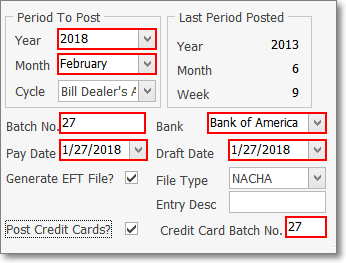
Post Auto Drafts - NACHA selected
•Period To Post - Define what Recurring Billing Period is being processed for Pre-Authorized Auto Drafts.
✓Year - Use the Drop-Down Selection List to Choose the Year that is being processed for Pre-Authorized Auto Drafts.
✓Month - Use the Drop-Down Selection List to Choose the Month that is being processed for Pre-Authorized Auto Drafts.
✓Cycle - If the Multiple Billing Cycles feature has been implemented, use the Drop-Down Selection List to Choose the Recurring Billing Cycle that is being processed for Pre-Authorized Auto Drafts.
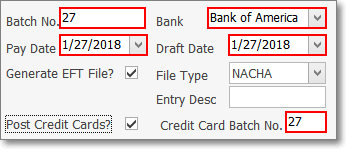
Post Auto Drafts - NACHA options
•Batch No. - By default, it will be the calendar number of Today. Change this Batch Number, as needed.
•Bank - The correct Bank Name will be automatically inserted based on the Bank assigned to the selected Recurring Billing Cycle.
•Pay Date - By default, it will be Today
✓Use the Drop-Down Calendar/Date Entry field to Choose the Date these Invoices will be marked as Paid within the Accounts Receivable System.
✓This Pay Date should be on or after the Draft Date entered next.
•Draft Date - By default, it will be Today
✓Use the Drop-Down Calendar/Date Entry field to Choose the Date that these Amounts will be Withdrawn (Drafted) from the Subscriber's Bank account, and/or Charged to their Credit Card.
✓This Draft Date should be on or before the Draft Date entered prevously.
•Generate EFT File - You will need an EFT file generated, so Click this Generate EFT File? box.
•File Type - Use the Drop-Down Selection List to Choose the NACHA EFT system.
•Entry Desc - For the NACHA (and Wells Fargo) File Types, enter a brief Description of the purpose for these Charges (e.g., 'Monitoring', 'Service Contract').
•Post Credit Cards? - If this Auto Draft process should post both EFT Cash Deductions and Credit Card Charges, Check this box.
•Credit Card Batch No. - If Post Credit Cards? was Checked, this field will be activated and will become a mandatory entry.
✓Use separate batch number for Credit Cards? - Click Yes and enter the desired Batch Number below.
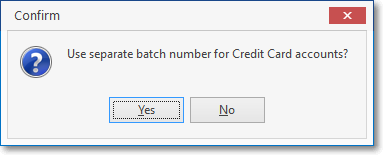
✓Credit Card Batch No. - By default it will also be the calendar number of Today. Enter the desired Batch Number, as appropriate, which may (usually will) be different than Today.
❑Understanding the NACHA File Format
•File Type: NACHA - For EFT Drafts Bank Accounts and Credit Cards
✓Requires these fields in EFT sub-tab of the Bank Table
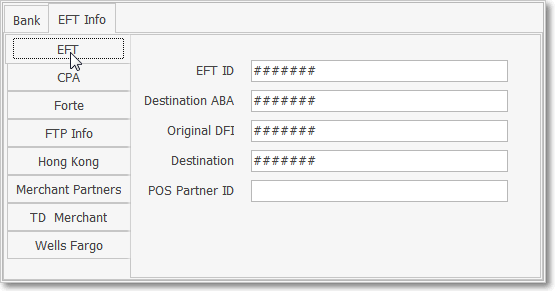
▪EFT ID - Enter the EFT ID specified by the EFT Processor.
▪Destination ABA - Enter the EFT Processor's Bank's Routing Number.
▪Original DFI - This is required by your EFT Processor and may be up to 10 characters in length.
▪Destination - Data required in the NACHA format specifications specified by the EFT Processor.
✓Produces a 94 Character Fixed Width File
•Auto Draft file's Output Fields
✓File Header Record (1)
1. Hard Coded Value = '101' (3 Characters)
2. Bank.DestinationABA - Company's Bank Routing Number (10 Characters)
3. Bank.EFTID - Company's ID number with the Bank (10 Characters)
4. Current Date - Format=yymmdd (6 Characters)
5. CurrentTime - Format=hhmm (4 Characters)
6. Hard Coded Value = 'A0941101' (7 Characters)
7. Bank.Destination - Company's Bank Name (23 Characters)
8. UserOptions.CompanyName - Company's Name (23 Characters)
9. BLANK - (8 Characters)
✓Batch Header Record (1)
1. Hard Coded Value = '5200' (4 Characters)
2. UserOptions.CompanyName - (16 Characters)
3. BLANK - (20 SPACES)
4. Bank.EFTID - (10 Characters)
5. Hard Coded Value = 'PPD'
6. Entry Description = Entered on Post Auto Draft Form (10 Characters)
7. BLANK - (6 SPACES)
8. Draft Date - Entered on Post Auto Draft Form (6 Characters)
9. Hard Coded Value = '1' (4 Characters 3 SPACES and the number 1)
10. Bank.OrigDFI - (8 Characters)
11. Hard Coded Value - (7 Characters, 6 Zeros and the number 1)
✓Transaction Records (as required)
1. Hard Coded Value = '6' (1 Characters)
2. Subscriber.BankNumber - "27" Checking Deduction or "37" Savings Deduction (2 Characters)
3. TransitNumber -
if Bank Account - Subscriber's bank routing number
if Credit Card - 4 Zeros + Subscriber.CardEpiryDate 'mmyy'
4. TransitCheckDigit -
if Bank Account - '1'
if Credit Card - 1 Space
5. AccountNumber -
if Bank Account - Subscriber's bank account number
if Credit Card - Subscriber's Credit Card number
6. Transaction Amount - InvoiceHeader.BalanceDue
7. CustomerID - Subscriber.BillPayer
8. Customer - Subscriber.SubscriberName
9. Hard Coded Value = '0'
10. Bank.OrigDFI + Currnet Transaction Count (Pad Left with Zeros)
➢If this is a Credit Card Transaction, add an address line for verification
Address Verification Record (1)
1. Hard Coded Value = '7'
2. CustomerID = Subscriber.BillPayer
3. Address = Subscriber.AddressStreet
4. City = Subscriber.AddressCity
5. State = Subscriber.AddressState
6. Zip = Subscriber.AddressZip
7. BLANK - 19 Spaces
✓Batch Control Footer Record (1)
1. Hard Coded Value = '8200' (4 Characters)
2. TransactionCount - (6 Characters)
3. Hard Coded Value = '0' (10 SPACES)
4. Debit Total - Total Amount to Deposit to Company Bank (12 Characters)
5. Credit Total - always 0.00 left padded with zeros (12 Characters)
6. Bank.EFTClientID (10 Characters)
7. BLANK - (25 SPACES)
8. Bank.OrigDFI
9. Hard Coded Value = '1' (7 Characters 6 SPACES and the number 1)
✓File Footer Record (1)
1. Hard Coded Value = '9'
2. Hard Coded Value = '1' (6 characters 5 zeros and the number 1)
3. Bank.EFTID - Company's ID number with the Bank (10 Characters)
4. BlockCount = Total number of records divided by 10
5. TransactionCount = Number of transactions
6. Hard Coded Value = '0' for 10 characters (10 Characters)
7. DebitTotal - Total Amount to Deposit (12 Characters)
8. CreditTotal - Always 0.00 (12 Characters)
9. BLANK - (39 Characters)