
|
Hong KongThis Help File Page was last Modified on 12/07/2018 |


|
|
Hong KongThis Help File Page was last Modified on 12/07/2018 |
 Scroll to Top of Page
 Print Topic
 Email Feedback
 Show/Hide Expanders
**************************************************************
* INSTRUCTIONS FOR HONG KONG PAY IMPORT *
**************************************************************
This Chapter is still being revised!
❑Hong Kong
File Type: Drafts Bank Accounts Only
- Requires HKBankAccount field in Bank Table
- Produces Comma Delimted File
- Output Fields
1. Hard Coded Value = 'R'
2. Subscriber.BillPayer
3. InvoiceHeader.InvoiceNumber
4. Subscriber.RoutingNumber
5. Subscriber.BankAccountNumber
6. InvoiceHeader.BalanceDue
7. Draft Date - Format=mm/dd/yy
8. Subscriber.SubscriberName
9. Hard Coded Value = 'M'
10. Bank.EFTID
❑When your Company selects Hong Kong as the File Type to be used for Auto Draft Processing, the options available to be selected are:
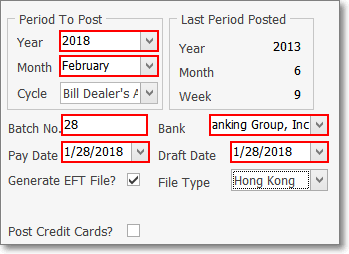
Post Auto Drafts - Hong Kong options
•Period To Post - Define what Recurring Billing Period is being processed for Pre-Authorized Auto Drafts.
✓Year - Use the Drop-Down Selection List to Choose the Year that is being processed for Pre-Authorized Auto Drafts.
✓Month - Use the Drop-Down Selection List to Choose the Month that is being processed for Pre-Authorized Auto Drafts.
✓Cycle - If the Multiple Billing Cycles feature has been implemented, use the Drop-Down Selection List to Choose the Recurring Billing Cycle that is being processed for Pre-Authorized Auto Drafts.
•Batch No. - By default, it will be the calendar number of Today. Change this Batch Number, as needed.
•Bank - The correct Bank Name will be automatically inserted based on the Bank assigned to the selected Recurring Billing Cycle.
•Pay Date - By default, it will be Today
✓Use the Drop-Down Calendar/Date Entry field to Choose the Date these Invoices will be marked as Paid within the Accounts Receivable System.
✓This Pay Date should be on or after the Draft Date entered next.
•Draft Date - By default, it will be Today
✓Use the Drop-Down Calendar/Date Entry field to Choose the Date that these Amounts will be Withdrawn (Drafted) from the Subscriber's Bank account.
✓This Draft Date should be on or before the Draft Date entered previously.
•Generate EFT File - You will need an EFT file generated, so Click this Generate EFT File? box.
•File Type - Use the Drop-Down Selection List to Choose the Hong Kong EFT system.
•Post Credit Cards? - Do Not Check this box
✓This Auto Draft processor will only post EFT Cash Deductions.
❑Understanding the Hong Kong File Format
•File Type: Hong Kong - For Drafting Bank Accounts Only
✓Requires the Account # entry in the Hong Kong sub-tab of the Bank Table
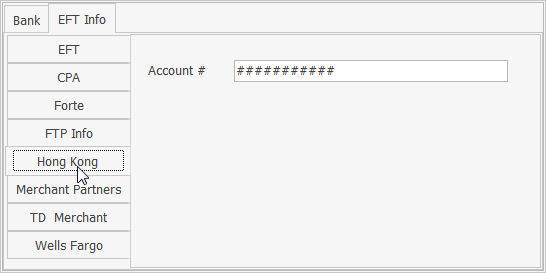
✓Produces a Comma Delimited text file.
•Auto Draft file's Output Fields
1. Hard Coded Value = 'R'
2. Subscriber>Bill Payer
3. Invoice Header>Invoice Number
4. Subscriber>Routing Number
5. Subscriber>Bank Account Number
6. Invoice Header>Balance Due
7. Post Auto Draft>Draft Date - Format = mm/dd/yy (e.g., '02/01/18')
8. Subscriber>Subscriber Name
9. Hard Coded Value = 'M'
10. Bank>Hong Kong sub-tab>Account #