
|
Signal Processing ErrorsThis Help File Page was issued on 09/30/2017 This Help File Page was last Modified on 05/28/2024
|


|
|
Signal Processing ErrorsThis Help File Page was issued on 09/30/2017 This Help File Page was last Modified on 05/28/2024
|
 Scroll to Top of Page
 Print Topic
 Email Feedback
 Show/Hide Expanders
❑Failed Service Warning - The SPA Main Menu has a Connections status area at the bottom of the Form.
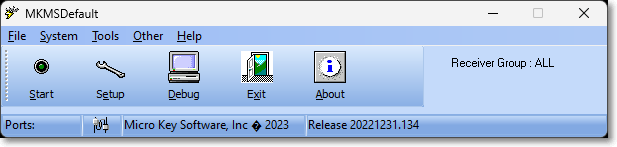
SPA - Signal Processing Application - Main Menu
•The Connections Status Icon (see the mouse pointer in the illustration immediately below) will display the Failed Service Grid
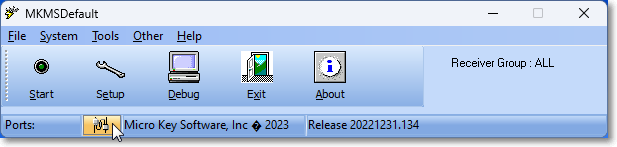
SPA - Signal Processing Application - Connection Status Icon
✓Click the Connections Status Icon to open the Failed Service dialog.
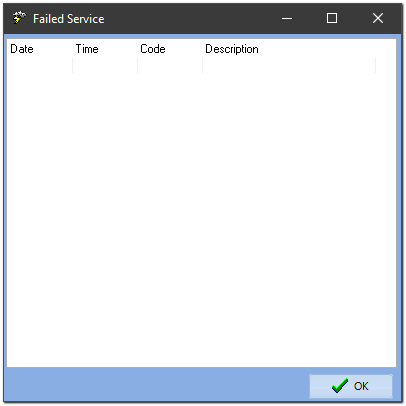
SPA Desktop - Failed Services dialog - accessed using the Failed Service Icon
•See SPA System Menu - Options for more information.
❑The following CSID Zone information must be entered for the "SPA" Subscriber whose Subscriber Panel CSID is SPA.
•Please read Special Subscriber, Subscriber Panel and CSID Zones for additional information.
•These records define the special Signal Processing Error signals sent by the Signal Processing Application.
•The special CSID Zones that are required to be defined for the SPA Subscriber Panel are as follows:
✓Signal ID = A109 Alarm Code = System Messages OCTAR = Alarm Description = Hard Lock not found
✓Signal ID = A110 Alarm Code = System Messages OCTAR = Alarm Description = Hard Lock Disconnected (no response required)
✓Signal ID = A111 Alarm Code = System Messages OCTAR = Alarm Description = Hard Lock Connected
✓Signal ID = A112 Alarm Code = System Messages OCTAR = Alarm Description = Grace period exceeded (after hard lock not found)
✓Signal ID = A113 Alarm Code = System Messages OCTAR = Alarm Description = Invalid date computer date time on the SPA computer (no response required)
✓Signal ID = A114 Alarm Code = System Messages OCTAR = Alarm Description = Database Disconnected (no response required)
✓Signal ID = A115 Alarm Code = System Messages OCTAR = Alarm Description = Emergency Mode Activated
✓Signal ID = A116 Alarm Code = System Messages OCTAR = Alarm Description = Emergency Mode De-Activated
✓Signal ID = A117 Alarm Code = System Messages OCTAR = Alarm Description = Login by user into MKMSCS
(Physical zone will show the Employee code)
✓Signal ID = A118 Alarm Code = System Messages OCTAR = Alarm Description = Logout by user into MKMSCS
(Physical zone will show the Employee code)
✓Signal ID = A119 Alarm Code = System Messages OCTAR = Alarm Description = Background Processor Error
This error may cause the software to not properly process the FC*, FO*, FT*,
nor to move the account out of the ‘On Test’ table,
nor to restore accounts out of the ‘On Hold’ state in the alarm-stack table,
nor to activate/deactivate relay cards.)
✓Signal ID = A120 Alarm Code = System Messages OCTAR = Alarm Description = Invalid Package (in Receiver)
✓Signal ID = A121 Alarm Code = System Messages OCTAR = Alarm Description = Customer Note with no response needed
✓Signal ID = A122 Alarm Code = System Messages OCTAR = Alarm Description = Background Processing has been reset
✓Signal ID = A123 Alarm Code = System Messages OCTAR = Alarm Description = Alarm Signal Thread has been reset
✓Signal ID = A124 Alarm Code = System Messages OCTAR = Alarm Description = Shift Change timeout!
(A user has selected Shift Change, but waited more than 30 seconds to enter ID)
✓Signal ID = A125 Alarm Code = System Messages OCTAR = Alarm Description = Unattended alarm pre-activation
(Physical zone is filled with employee code)
✓Signal ID = A126 Alarm Code = System Messages OCTAR = Alarm Description = Unattended alarm activation
(Physical zone is filled with employee code)
✓Signal ID = A127 Alarm Code = System Messages OCTAR = Alarm Description = Invalid SIA package or Unable to process SIA package
✓Signal ID = A128 Alarm Code = System Messages OCTAR = Alarm Description = Temp Note Added/Modified/Deleted
✓Signal ID = A129 Alarm Code = System Messages OCTAR = Alarm Description = Invalid Redirection or Self Redirected alarm.
(Alarm detail will contain the original account's CSID with Signal Identifier and Physical Zone)
✓Signal ID = A130 Alarm Code = System Messages OCTAR = Alarm Description = Account canceled via Dealer Client or Millennium
✓Signal ID = A131 Alarm Code = System Messages OCTAR = Alarm Description = Account set to offline
✓Signal ID = A132 Alarm Code = System Messages OCTAR = Alarm Description = Account set to online
✓Signal ID = A133 Alarm Code = System Messages OCTAR = Alarm Description = Immix/Sureview Connected
✓Signal ID = A134 Alarm Code = System Messages OCTAR = Alarm Description = Immix/Sureview Disonnected
✓Signal ID = A135 Alarm Code = System Messages OCTAR = Alarm Description = Operator Started Polling
✓Signal ID = A136 Alarm Code = System Messages OCTAR = Alarm Description = Operator Stopped Polling
✓Signal ID = A137 Alarm Code = System Messages OCTAR = Alarm Description = Operator Activated Manual Mode
✓Signal ID = A138 Alarm Code = System Messages OCTAR = Alarm Description = Action Plan Switch to Manual Mode
✓Signal ID = A139 Alarm Code = System Messages OCTAR = Alarm Description = Number of Unverified Zones
✓Signal ID = A140 Alarm Code = System Messages OCTAR = Alarm Description = Stack Maintenance Performed
(Zone will be Operator's Code)
✓Signal ID = A141 Alarm Code = System Messages OCTAR = Alarm Description = System monitoring event (failed)A
Zone 1: CPU
Zone 2: Memory
Zone 3: Hard drive space
✓Signal ID = A142 Alarm Code = System Messages OCTAR = Alarm Description = System monitoring event (restored)
Zone 1: CPU
Zone 2: Memory
Zone 3: Hard drive space
✓Signal ID = A143 Alarm Code = System Messages OCTAR = Alarm Description = Unresponsive process detected by SysStatus
✓Signal ID = A145 Alarm Code = System Messages OCTAR = Alarm Description = Subscriber changed remotely by Dealer
✓Signal ID = A146 Alarm Code = System Messages OCTAR = Alarm Description = Signal overdue 90+ seconds
✓Signal ID = A147 Alarm Code = System Messages OCTAR = Alarm Description = Invalid records in Event table detected
✓Signal ID = A148 Alarm Code = System Messages OCTAR = Alarm Description = SMS/IVR subscribe
✓Signal ID = A149 Alarm Code = System Messages OCTAR = Alarm Description = SMS/IVR unsubscribe
✓Signal ID = A150 Alarm Code = System Messages OCTAR = Alarm Description = Operator generated Duress
✓Signal ID = A151 Alarm Code = System Messages OCTAR = Alarm Description = Signal Parsing Fails(Text2Alarm)
✓Signal ID = A152 Alarm Code = System Messages OCTAR = Alarm Description = Unacknowledged Signal Processing Notification
➢Note: Alarm Code - An Alarm Condition Code must be predefined to ensure the proper processing of these SPA and Receiver CSID Zones.
✓MSG - System Messages