
|
Widgets - Service TicketsThis Help File Page was last Modified on 02/11/2017 |


|
|
Widgets - Service TicketsThis Help File Page was last Modified on 02/11/2017 |
 Scroll to Top of Page
 Print Topic
 Email Feedback
 Show/Hide Expanders
❑The Service Tickets Widget provides a summary list in the form of a Grid with the status of various classification of Work Orders (e.g., Open, Scheduled by Type [i.e., today's Orders and Installs], recently Completed, and recently Billed)
•The Service Tracking System module must be Registered and the current User provided with Access Rights, to have this Service Tickets Widget available.
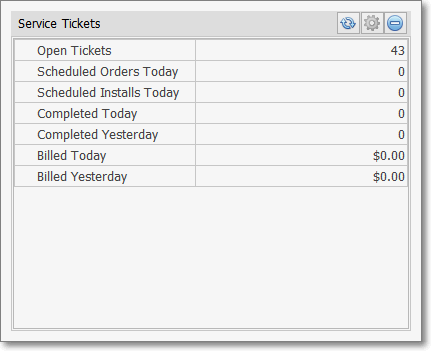
Service Tickets Widget
•There are no Configuration Options available for thisService Tickets Widget so the Maintenance Icon is inactive.
•Click the Refresh icon on the Service Tickets Widget to Refresh the data.

•The Service Tickets Widget item may be "collapsed" or "expanded" as needed.

✓Click its Blue Minimize button to "collapse" the Service Tickets Widget.
✓Click its Blue Minimize button again to "expand" the Service Tickets Widget.