
|
Re-Declare Mandatory AccountsThis Help File Page was last Modified on 02/08/2017 |


|
|
Re-Declare Mandatory AccountsThis Help File Page was last Modified on 02/08/2017 |
 Scroll to Top of Page
 Print Topic
 Email Feedback
 Show/Hide Expanders
❑The Mandatory Account Declarations that were entered when the General Ledger Setup Wizard procedure was executed may be altered at a later date, if necessary.
•Because of business reasons, you way want to reassign a Mandatory Account number
•Sometimes, as the result of an Upgrade being installed, you may be asked to define one or more additional Mandatory Accounts.
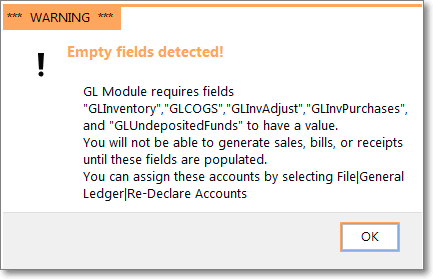
Warning - Empty Fields Detected!
Additional Mandatory Accounts required
•To open the Account Declaration Form:
a)From the Backstage Menu System Select File and Choose General Ledger then Click the Re-Declare Accounts option.
b)From the Quick Access Menu, Select File and Choose General Ledger then Click the Re-Declare Accounts option.
✓The Account Declaration Form will be displayed.
✓Use the appropriate Drop-Down Selection List to re-assign one or more of the Mandatory Accounts:
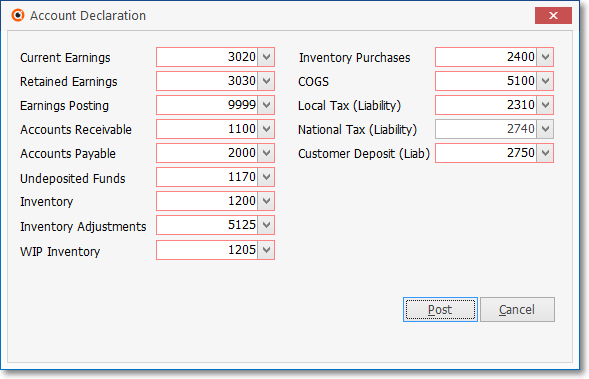
The General Ledger Setup Wizard - Mandatory Account Declaration entries
•The Mandatory Accounts required for the General Ledger Wizard Setup - specifically in the Account Declaration Form are:
1.Current Earnings - This must be the Equity Account for Current Earnings.
2.Retained Earnings - This must be the Equity Account for Retained Earnings.
3.Earnings Posting - This must be the Special Expense Account (a Debit Account) for Posting Earnings.
4.Accounts Receivable - This must be the Asset Account for Accounts Receivable.
5.Accounts Payable - This must be the Liability Account for Accounts Payable.
6.Undeposited Funds - This must be created as the Asset Account for Undeposited Receipts.
7.Inventory - This must be the Asset Account for Inventory.
8.Inventory Adjustments - This must be the Expense Account for Inventory Adjustments.
9.WIP Inventory - This must be an Asset Account for the Inventory Items that have been identified as part of a Work In Progress.
a)If the Inventory Tracking System has not been Setup, this WIP Inventory entry is optional, not mandatory.
10.Inventory Purchases - This must be the Liability Account for Inventory Purchases.
11.COGS (Cost of Goods Sold) - This must be the Expense Account for Cost of Goods Sold.
12.Local Tax (Liability) - This must be the Liability Account for Local Sales Tax Liability.
13.National Tax (Liability) - This must be the Liability Account for National Sales Tax Liability.
14.Customer Deposit (Liab) - This must be the Liability Account for Advance Deposits.
Canadian Sales Tax:
15.HST/GST (Asset) - Only required when the CanadaTax option is set to True ("T") in the Company Settings list, this field must be the Asset Account designated for HST/GST tax collections.
16.PST (Expenses) - Only required when the CanadaTax option is set to True ("T") in the Company Settings list, this field must be the Expense Account designated for PST tax charges.
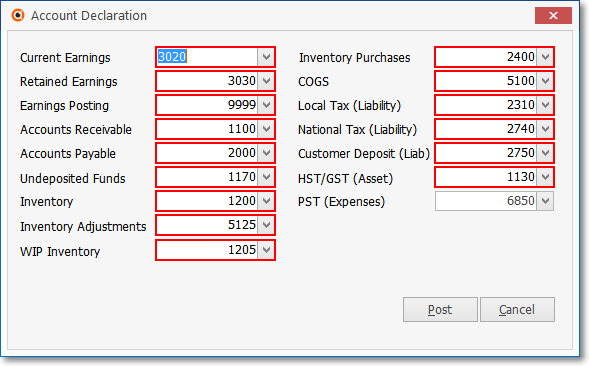
Mandatory Account Declaration Form when CanadaTax is are set to True ("T")
•Click Post to save your changes, or Cancel to abort the process.
.png)
✓Click the No button if you've changed your mind and want to abort the Re-Declaration process.
❖See the Use of, and Purpose for Mandatory Accounts chapter for more information.
❑Making Account Balance Adjustments when Required:
•If you have reassigned a Mandatory Account Number from one Account to another and either of those Accounts had an existing Account Balance
✓That (those) Account Balance(s) for the old (previous) and/or the newly assigned General Ledger Account must be adjusted.
✓Use the General Journal Form to execute the Account Balance Transfer requirement.
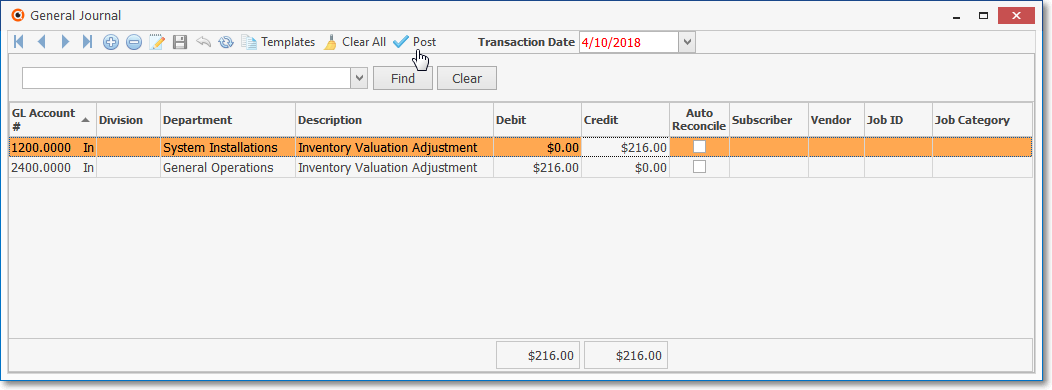
General Journal Form - General Journal Entries sample
•When (if) the Transfer of an Account Balance from one Account to another will also effect the Current Earnings and Earnings Posting General Ledger Accounts,
✓Those Earnings associated Financial Transactions will be executed automatically by the General Ledger System
✓These automatic Financial Transactions may be confirmed by viewing them in the Transaction File Form.